How to Book a Restaurant in Korea Without a Korean Number
“Every reservation system that works in Korea—including the ones that don't require speaking Korean.”
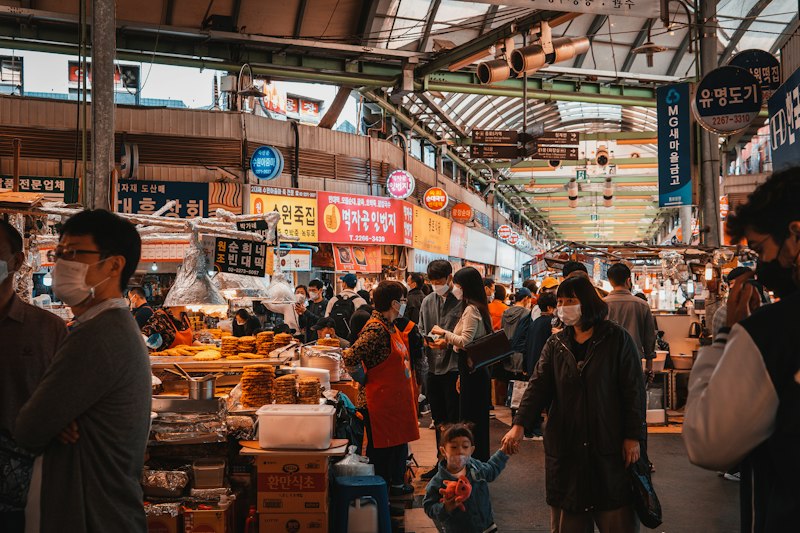
How to Book Restaurants in Korea as a Foreigner
Securing a table at a popular Korean restaurant is not as simple as walking in and asking for two seats. The dining culture in Korea—particularly in Seoul—has evolved into a layered system of reservations, digital queues, and social media channels that most foreign visitors never fully understand until they are standing outside a fully booked restaurant on a Saturday night with no plan and no idea where to start.
| Method | Korean Phone Needed? | Best For |
|---|---|---|
| Catchtable Global | No — email, Apple, or Google sign-up | Most restaurants, 12,000+ listed, English support |
| Naver Map app | Often required for booking | Checking hours, menus, reviews (not booking) |
| Hotel concierge | No | Fine dining, hard-to-book Michelin spots |
| Walk-in | No | Casual restaurants, most local spots |
Catchtable Global supports English, Japanese, and Chinese, and integrates with Google Maps. Download on the App Store or Google Play. Most casual restaurants in Korea don't require any reservation at all.
The good news: every one of these systems is accessible to foreigners. The barrier is not language—it is knowing which tool to use and when. This guide covers every reservation method available in Korea in 2026, with practical steps for each.
Before you travel, the Korea Trip Checklist 2026 covers essential apps to install before your flight, including everything you need for restaurant reservations. If you are still planning your arrival logistics, the Incheon Airport arrival guide covers every transport option from the airport to the city.
Why Reservations Matter More Than You Think
Walk-in culture in Korea is situational. At local lunch spots, pojangmacha stalls, and neighborhood jjigae restaurants, walking in without a plan is the norm. At anything that has appeared on a Korean food program, gained traction through a food influencer, or simply opened in a trending neighborhood—walk-in is often not an option at all.
The pressure intensifies during Korean public holidays (Chuseok, Lunar New Year, Children's Day weekends) and peak tourist seasons in spring and autumn. Popular spots in Seongsu-dong, Mangwon, and Itaewon can have reservation slots fully booked two to three weeks in advance.
Language adds a second layer of friction. Most popular Korean restaurants are owner-operated with no English-speaking staff. Calling to make a reservation—which many older establishments still require—means speaking Korean or knowing someone who can. The platforms below solve this problem, and they are better than calling in any language.
Catchtable Global: Book Without a Korean Phone Number
Catchtable Global is the dedicated app foreign tourists use to book restaurants in Korea. It does not require Korean identity verification or a Korean phone number, which sets it apart from the regular Catchtable app used by locals — and from most other booking platforms in the country.
Sign up takes under a minute with an email address, Apple ID, or Google account. The app covers everything from Michelin-starred restaurants to trending neighborhood spots, with real-time review translation so foreign visitors can read Korean reviews in their own language. Download on the App Store: https://apps.apple.com/kr/app/catchtable-book-restaurants/id1639046576 — also available on Google Play.
Option 1: Naver Map Reservations (네이버 예약)
Naver Map is Korea's essential navigation and local discovery platform. What most international visitors miss is that it also hosts one of the country's largest reservation systems—and it runs in English.
Naver Map is the most important navigation tool for getting around Korea as a foreigner, but its built-in booking function is a capability that the guide above covers in full detail. Here is how the reservation flow works.
Finding the Book Button
Open Naver Map and search for the restaurant by name. On the venue listing page, look for the blue 예약 (Book) button below the name and rating. Not every restaurant uses this system—small family-run places rarely do—but a significant number of mid-range and popular venues participate.
Step-by-Step: Making the Booking
After Booking: KakaoTalk Confirmation
Most restaurants send a booking confirmation via KakaoTalk, Korea's dominant messaging app. Install KakaoTalk before you travel and register with your phone number — the confirmation message will arrive there, and you may need to show it at the door.
Tip: Enter your name in Korean phonetic characters if possible. Google Translate can convert it — "Sarah Lee" becomes "사라 리." Korean restaurant staff can locate a Korean phonetic name in their system far more quickly than a romanized foreign name.
Option 2: Catch Table (캐치테이블)
Catch Table is Korea's specialist reservation platform for fine dining and high-demand restaurants. If Naver Map is the generalist tool, Catch Table is where the serious reservations happen — tasting menus, Michelin-recognized restaurants, and the most sought-after tables in Seoul.
Signing Up as a Foreigner
Download the Catch Table app (available in English on iOS and Android). Registration requires phone number verification. A Korean SIM or eSIM acquired at Incheon Airport works directly. If you are pre-installing before travel, some international numbers are accepted — attempt the registration with your home number first.
Browsing English-Friendly Restaurants
The English interface covers all core search and booking functions. Filter by neighborhood, cuisine, or dining type. Catch Table flags restaurants with English language support — look for the language indicator on venue listings. Itaewon and Gangnam have the highest concentration of English-comfortable venues on the platform.
Cancellation Policy & No-Show Fees
Catch Table enforces cancellation policies on behalf of participating restaurants — and they are real. Most require cancellation at least 24 hours in advance, with high-demand venues extending this to 48 or 72 hours. No-show fees are charged to the card on file. Read the terms before confirming, and set a phone reminder for the cancellation window if your plans might change.
Option 3: Instagram DM & Kakao Channel
A category of Korean restaurants — usually small, design-forward, and operating in neighborhoods like Seongsu-dong or Mangwon — never joined a reservation platform. They take bookings exclusively via Instagram direct message or KakaoTalk Channel. If the restaurant has a strong Instagram presence and no Naver reservation button, this is where you go.
The DM Reservation Template
Search for the restaurant on Instagram. If the bio or a pinned post mentions DM reservations (DM으로 예약), send this message — copy and paste it directly:
"안녕하세요! 예약 가능한지 여쭤보고 싶습니다. [날짜] [시간] [인원 수]명 방문 가능할까요? 감사합니다."
Replace [날짜] with the date in Korean format (e.g., 6월 22일 for June 22nd), [시간] with the time (e.g., 오후 7시 for 7pm), and [인원 수] with your party size (e.g., 2).
Using KakaoTalk Channel
KakaoTalk 채널 (Channel) functions as a business messaging layer within KakaoTalk. Search for the restaurant's name in the Channel search bar. Once you follow the Channel, send a reservation request using the same template above. Response times are variable — some restaurants respond within hours, others within two days.
If They Don't Respond
Wait 48 hours before following up. If a second message also goes unanswered, the restaurant may not actively monitor its messaging, or may have paused reservations for the period you want. Treat it as a walk-in candidate and apply the strategies below.
Option 4: Walk-in Strategies & Waiting Apps
Planning a trip to Korea?
Answer a few quick questions and get a personalized day-by-day itinerary — cities, food, and transit included. No sign-up needed.
Build My Korea Plan →Some restaurants are best approached without a reservation — either because they don't accept them, or because same-day digital queues offer an equivalent path to a table.
Naver Map 웨이팅 (Waiting)
The waiting feature in Naver Map allows you to join a digital queue before you arrive in person. Search for the restaurant — if a 웨이팅 (Waiting) button appears alongside or instead of the reservation button, tap it to join the queue. The app sends a notification when your table is approaching, so you can wait at a nearby café rather than standing on the street.
Catchtable 웨이팅
Catch Table runs its own same-day queue system for participating restaurants. These queues typically open at 9–10am on the day. Check the app early — popular spots fill their digital queues within the first thirty minutes of opening.
Best Walk-in Windows
Handling the Language Barrier
Language will not stop you from eating well in Korea, but having the right tools active on your phone makes every restaurant interaction faster and less stressful.
Google Translate's camera mode handles menus well. Open the app, switch to the camera function, and point it at the menu — Korean text overlays in English in real time. Accuracy is high for ingredient names and dish types, and sufficient for everything else.
Papago (developed by Naver) is generally considered more accurate than Google Translate for Korean. Download it before you travel. The conversation mode — where both parties speak alternately into the phone — handles short exchanges like allergy declarations and table requests well enough for practical use.
Show your confirmation screenshot. The single most effective language workaround at the restaurant door is displaying your reservation confirmation on screen. Restaurant staff who cannot read English can match a booking reference number, date, and time against their system without any verbal exchange required.
Recommended Restaurant Types for Foreigners
Some restaurant categories have almost no language barrier and rarely require advance reservations.
Korean BBQ — galbi, samgyeopsal, chadolbaegi — is among the most accessible dining experiences in Korea for foreign visitors. Ordering means choosing a meat type from a picture menu. Cooking happens at the table. Side dishes arrive automatically. Most BBQ restaurants accept walk-ins and operate with less reservation pressure than other popular formats.
Convenience store meals are a legitimate daily option, not a compromise. The prepared food sections at GS25, CU, and 7-Eleven in Korea operate at a standard far above their international equivalents. Triangle gimbap, ramen made at the in-store hot water station, and freshly packed dosirak boxes constitute a full and satisfying meal for under ₩5,000.
Korean street food stalls — tteokbokki, hotteok, twigim — require no reservation and almost no Korean. Point, pay, and eat. The Korean street food guide covers what to order and where to find the best stalls.
Book a Klook Cooking Class or Food Tour
For visitors who want to experience Korean food culture without any language barrier — and with built-in context about ingredients, technique, and market culture — Klook's English-language cooking classes and market tours are the cleanest solution. These experiences are guided entirely in English, include the market context that a restaurant visit alone cannot provide, and require no Korean at any point.
Quick Tips & Common Mistakes to Avoid
Korea's restaurant culture rewards preparation but does not exclude the unprepared. Every system described here is genuinely accessible to foreign visitors — the only requirement is knowing the system exists before you need it.
Frequently Asked Questions
Can foreigners book restaurants in Korea without a Korean phone number?
Yes. Catchtable Global lets foreign tourists sign up with just an email, Apple, or Google account — no Korean phone number or ID verification needed.
What app do tourists use to book restaurants in Korea?
Catchtable Global is the most widely used app for foreign tourists, covering over 12,000 restaurants with English, Japanese, and Chinese support.
Does Naver Map let you book restaurant reservations?
Naver Map mainly shows hours, menus, and reviews. Direct booking is often Korean-only, so Catchtable Global or walk-ins work better for foreigners.
Do I need a reservation to eat at restaurants in Seoul?
Most casual restaurants and street food spots don't require reservations. Popular or fine-dining restaurants, especially Michelin-listed ones, often do.
How do I book a Michelin restaurant in Korea as a tourist?
Use Catchtable Global, which lists Michelin-starred restaurants and lets you book directly with an English interface, no Korean phone number required.
Make a plan that fits your trip
This guide gives one version. Get one built around your own dates, budget, and interests — with Korean place names you can paste straight into Naver Map. No sign-up needed.
Build My Korea Plan →